
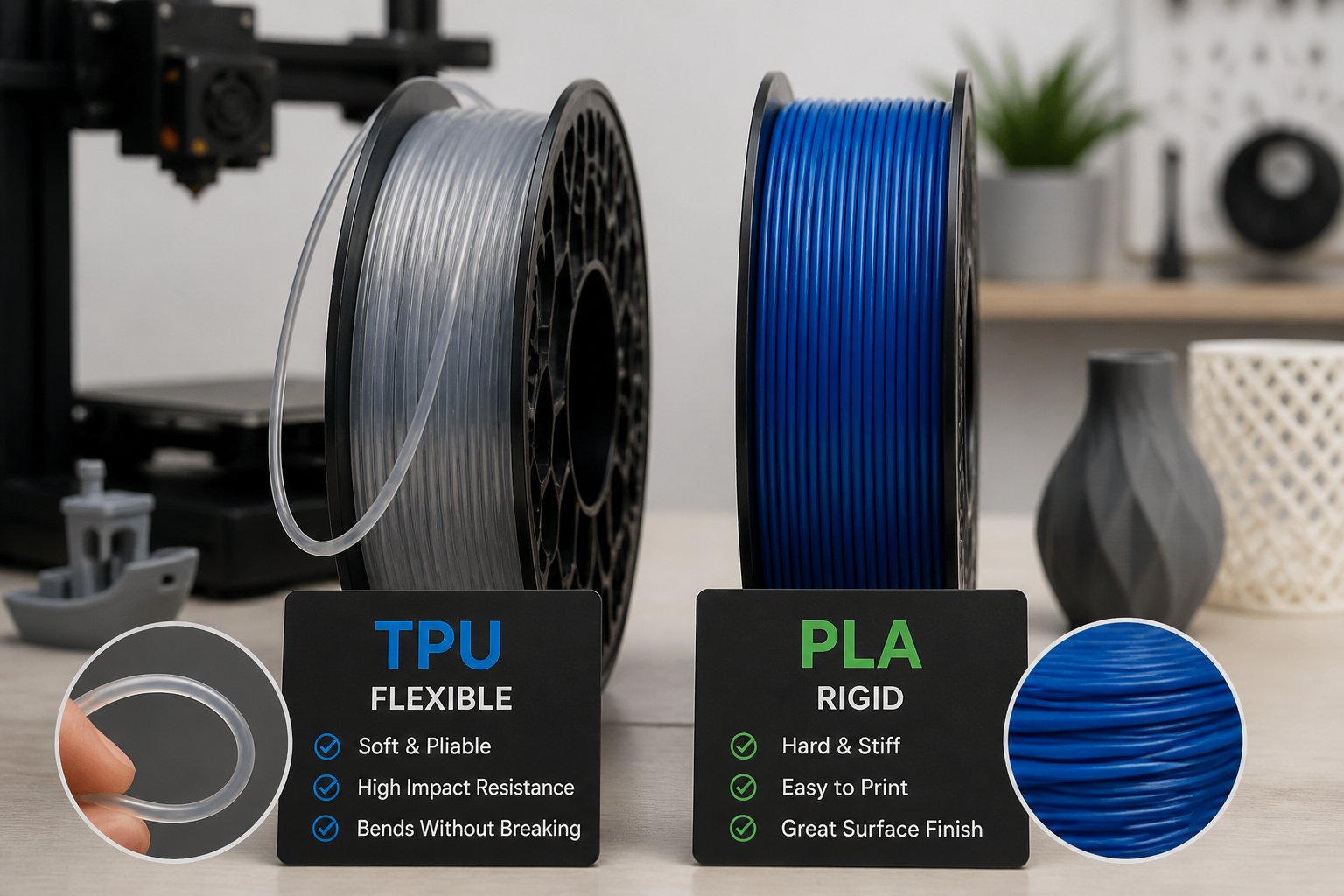
TPU vs PLA comes down to one core question — do you need your part to flex or hold its shape? Both are popular filament choices, but they behave very differently once they leave the nozzle. PLA is rigid, easy to print, and great for detailed models that stay indoors. TPU is rubber-like, impact-resistant, and built for parts that need to bend, stretch, or absorb shock. In this guide, we break down the key differences, best uses, and print tips for both — so you can pick the right filament for your next project.
- PLA is rigid and easy to print, while TPU is flexible and durable for parts that need to bend or absorb impact
- TPU requires a direct drive extruder and slower print speeds, but PLA works on most printers with basic settings
- Choose PLA for decorative items and prototypes, and choose TPU for functional parts like phone cases, gaskets, and wearables
Need TPU that flexes without falling apart? Browse our flexible TPU filament collection and find the right spool for parts that need to bend, stretch, and bounce back.
Key Differences Between TPU and PLA

TPU (thermoplastic polyurethane) and PLA (polylactic acid) act very differently in practice, and your printer may not handle both equally well. TPU is a flexible thermoplastic elastomer that bends and absorbs impacts. PLA is a rigid filament that keeps its shape unless you push it too far.
Material Properties Comparison
PLA is stiff and has solid tensile strength, great for parts that need to hold their form. It barely bends before it snaps and can shatter if you drop it from a height.
TPU is flexible, almost rubbery. Most TPU 95A filaments are soft enough to squish but still print reliably. This stuff stretches a lot before it tears, so it's pretty forgiving if you put it under stress.
Impact resistance and shock absorption: TPU nails it here. Its layers stick together so well that prints are tough to break. PLA, not so much — it cracks or shatters if you hit it hard.
Durability characteristics: TPU stands up to abrasion and repeated bending. PLA doesn't love sunlight and can deform if you leave it loaded for too long. TPU keeps its flex across a range of temps, while PLA starts to droop around 60°C and loses its shape.
Surface finish: PLA gives you crisp, clean parts with sharp details. TPU is more prone to stringing and usually needs some cleanup if you want a smooth finish.
| Property | TPU | PLA |
|---|---|---|
| Flexibility | High — rubber-like | Low — rigid |
| Impact Resistance | Excellent | Moderate |
| Heat Resistance | Moderate | Low (~60°C) |
| Abrasion Resistance | High | Low |
| Surface Finish | Prone to stringing | Crisp and clean |
| UV Resistance | Moderate | Poor |
Print Settings and Hardware Requirements
Your printer setup can make or break your experience with these filaments. PLA prints on nearly any FDM 3D printer with barely any tweaks. TPU, though, asks a lot more from your gear and settings.
Print speed and temperature: PLA likes 190–220°C and can go pretty fast — 60mm/s or more. TPU 95A prefers 220–240°C but needs you to slow way down, usually 20–30mm/s, or else it'll buckle in the extruder.
Extruder requirements: Direct drive extruders are the way to go for TPU, since the short path keeps the filament from squishing and jamming. Bowden setups can print TPU, but you'll probably run into feeding headaches because of the long tube from the motor to the hotend.
Retraction settings: PLA handles standard retraction fine. TPU needs barely any — 1–2mm for direct drive — because pulling it back too much just causes jams as the filament bunches up.
Heated bed needs: PLA prints happily on beds at 50–60°C, or even without heat. TPU likes a slightly warm bed (40–60°C) to help that first layer stick.
| Setting | TPU | PLA |
|---|---|---|
| Nozzle Temp | 220–240°C | 190–220°C |
| Bed Temp | 40–60°C | 50–60°C (or none) |
| Print Speed | 20–30mm/s | 60mm/s+ |
| Retraction | 1–2mm (direct drive) | 2–4mm |
| Extruder Type | Direct drive preferred | Any |
| Filament Dryer | Recommended | Not required |
Looking for a reliable PLA that prints clean every time? Check out our PLA filament collection — perfect for detailed models, prototypes, and everyday prints.
When to Use Each Filament Type

TPU shines for parts that need to flex, cushion impacts, or squish without snapping. PLA is your friend when you want rigid parts, sharp details, or just want to crank out prototypes and display models fast.
Best Uses for TPU Filament
TPU really stands out where flexibility and shock absorption matter. Phone cases are a classic example — TPU soaks up drops, wraps around edges, and still fits in your pocket.
Use TPU for gaskets, seals, and grips that need to spring back after being squished. Door seals, bottle caps, o-rings — they all work with TPU. Vibration damping is another win for TPU, so it's great for motor mounts or tool handles.
Wearables like watch bands, mask straps, and shoe inserts stay comfy and flexible with TPU. It bends with you and doesn't crack or lose its bounce over time.
TPU is a smart pick for protective bumpers on corners and edges, or for gear that needs a little cushioning. Cable management clips and strain reliefs work well since they flex during installation. Any functional part that gets bent, stretched, or knocked around regularly is a good candidate for TPU.
Best Uses for PLA Filament
PLA is the go-to for structural parts that need to stay stiff. Brackets, housings, and mounting hardware all benefit from PLA's rigidity. If you're screwing or bolting things together, PLA holds its shape.
It's also ideal for prototypes and display models where looks and print quality matter more than toughness. PLA handles overhangs and sharp corners easily, and the prints come out smooth without the stringing you get with TPU. Plus, PLA prints faster and with fewer hiccups than flexible filaments.
Decorative objects, toys, and figurines that don't see much abuse or sunlight turn out great in PLA. There are tons of color and finish options, so you can get creative with the look.
PLA is perfect for quick test prints or design tweaks. It's cheap and easy to print, so you won't mind reprinting parts if you need to. PLA also nails fine details, small text, and tricky geometries that need good bridging.
Tips for Achieving Optimal Results
Getting good prints from TPU and PLA comes down to picking the right filament for your job and fixing issues before they waste your time or plastic. Dialing in your settings and knowing your materials saves a lot of headaches.
Troubleshooting Common Print Failures
Stringing shows up as wispy threads between parts. For PLA, bump up retraction to 2–4mm and crank travel speed to 150mm/s. With TPU, go easy — keep retraction under 2mm and slow retraction speed to 25mm/s, or you'll get jams.
Oozing is when melted filament dribbles from the nozzle during moves. If you spot blobs or extra plastic, drop your nozzle temp by 5–10°C. TPU is notorious for oozing if it's picked up moisture, so dry it in a filament dryer at 40–45°C for 4–6 hours before printing.
Most print fails come down to speed and temperature. Slow TPU down to 20–30mm/s to keep it from bunching up in the extruder.
For TPU, use 10–20% infill — more than that makes the part too hard and wastes material.
How to Choose the Right Filament for Your Project
Pick PLA if your part just needs to stay in shape under normal use. It's best for decorative pieces, prototypes, containers, and anything that lives indoors at room temp.
Go with TPU for anything that needs to bend, squish, or take a hit. Phone cases, gaskets, bumpers, wheels, and wearables all benefit from TPU's flexibility.
Combining TPU and PLA using dual extrusion lets you make parts with both rigid and flexible bits. Print the base in PLA, then add TPU grips, seals, or shock zones. Just check that your printer can handle multi-material printing and that the filaments stick together. This trick is great for tool handles, protective cases with hard frames, or custom grips.
Think about your printer's setup before choosing TPU. Direct drive extruders make flexible filament way easier to handle than Bowden systems, since the path is shorter and less twisty.
Need something between rigid and flexible? Shop our PETG filament collection — built for functional parts that need toughness, impact resistance, and moderate heat tolerance.
Conclusion: TPU vs PLA
TPU and PLA each have a clear role in your filament lineup. PLA is your go-to for easy, detailed prints that stay rigid and indoors. TPU is the pick when your part needs to flex, absorb impact, or survive repeated stress without cracking.
The best filament is always the one that matches what your part actually needs to do.
Want to take your printing further? Check out our guide on how to start a 3D printing business and find out how to turn your skills into something more.
Frequently Asked Questions: TPU vs PLA
TPU isn't always better than PLA, printing flexibles takes some technique, and your print surface isn't as important as your extruder setup.
Is TPU better than PLA?
TPU wins when you need flex and impact resistance — it bends instead of breaking, making it ideal for phone cases, grips, and bumpers. PLA is better for easy printing and stiff parts like models, brackets, and anything that needs to stay rigid. If your part doesn't need flexibility, PLA will save you time, and neither material handles high heat well — for that, look at PETG or nylon.
What are the disadvantages of TPU?
TPU prints much slower than rigid filaments and soaks up moisture fast, leading to bubbly, weak prints if you don't dry and store it carefully. Bowden extruders often struggle with TPU since the filament can buckle in the tube — direct drive setups make life much easier. Retraction is also tricky, as pulling flexible filament back can cause jams.
Why is TPU so hard to print?
TPU is soft and bendy, so it likes to twist and buckle in your extruder instead of feeding cleanly through. Direct drive extruders handle it best since there's minimal distance from the drive gear to the hot end — Bowden systems give the filament too much room to go wrong. Turn retraction way down or off, print slow at 20–30mm/s, and make sure your filament path is smooth with no gaps.
Can I print TPU on a PLA plate?
Yes — TPU grabs onto most surfaces at 40–60°C, including glass, PEI, and textured sheets, so you can use the same build plate as PLA. Clean your plate thoroughly before starting, as oil or dust will hurt adhesion every time. A glue stick can help with extra grip, but a clean, leveled plate is usually all you need.