
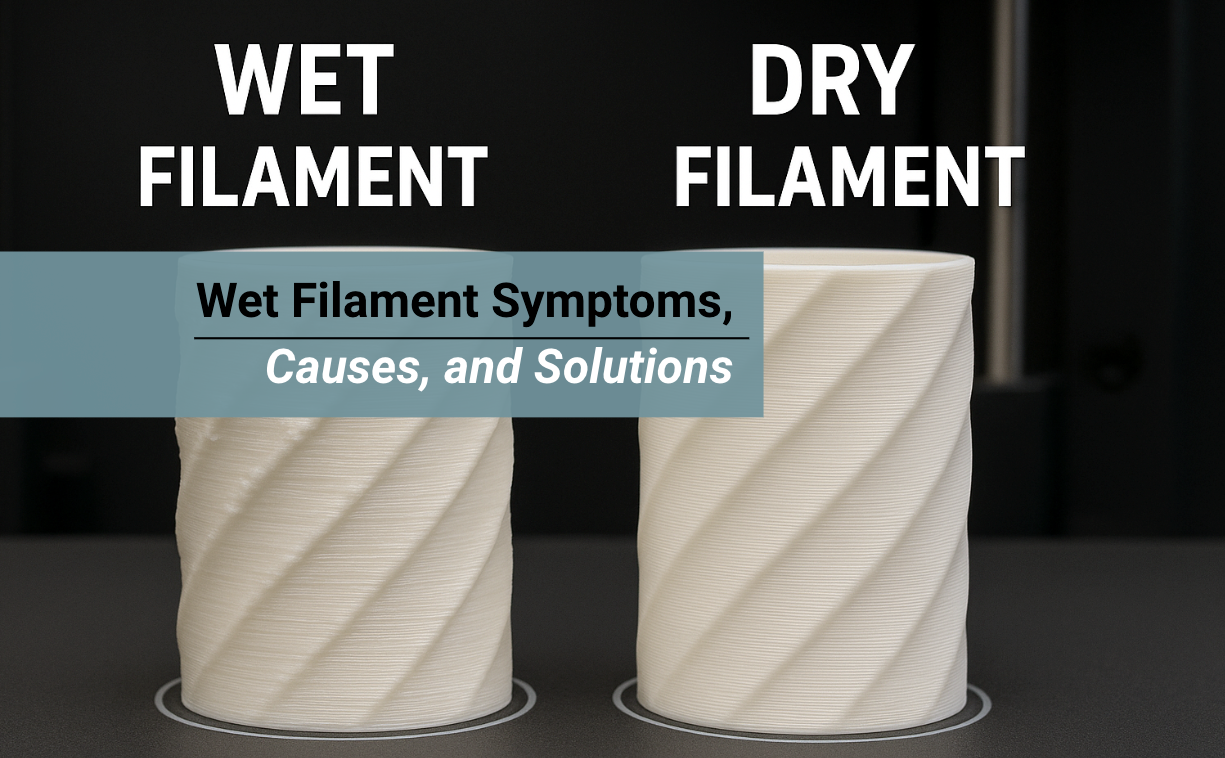
If you have ever heard your printer hiss, seen your prints come out rough, or noticed sudden stringing that was never there before, you might be dealing with wet filament. Wet filament symptoms can show up even when your settings are perfect.
This is because moisture affects how the plastic melts and flows through the nozzle. Once the filament absorbs water, every part of the print may change, from surface quality to layer strength.
In this guide, you will learn the main wet filament symptoms, what causes them, how to test for moisture, and the best solutions to fix and prevent wet filament issues.
Quick Insights:
- Wet filament symptoms include popping sounds, bubbles, stringing, and weak layers.
- Moisture enters the filament through humidity, poor storage, and long prints.
- You can fix a wet filament by drying it properly and storing it in an airtight container.
- Preventing moisture protects print strength, surface quality, and reliability.
3D Filaments You May Want to Shop
Explore More

What Are Wet Filament Symptoms and Why Do They Happen
Wet filament symptoms appear when moisture trapped inside the filament turns into steam inside the hotend.
When the plastic heats up, the water expands rapidly, disrupting the extrusion process and causing visible defects in your prints.
Moisture affects every stage of printing:
- It changes how the filament melts.
- It changes how the plastic bonds between layers.
- It causes weak spots inside the print.
- It ruins surface quality and shape accuracy.
This problem is more common than most people think, especially in humid climates or during rainy seasons.
How Moisture Interacts with 3D Printer Filament
Moisture does not sit on the surface of the filament. It gets absorbed into the plastic itself. When the filament melts, the water inside quickly boils into steam. That steam escapes through the nozzle, leaving behind bubbles and small voids inside the plastic.
This creates several problems:
- Steam bubbles form inside the extruded filament.
- Extrusion becomes inconsistent, jumping between thin and thick flow.
- Layer bonding weakens, which causes fragile prints.
- The surface texture becomes rough as steam escapes from the plastic.
When you understand this process, the symptoms begin to make sense.
Which Filaments Absorb Moisture the Fastest
Not all filaments behave the same. Some pick up moisture within hours, while others take days or weeks.
Most Hygroscopic Filaments
These must be stored carefully:
Moderately Hygroscopic Filaments
These absorb moisture more slowly but still show wet filament symptoms over time:
- PLA
- ABS
Even PLA can absorb moisture when left out for too long, especially in humid areas.
Most Common Wet Filament Symptoms to Watch For
These symptoms are the easiest way to tell if your filament is wet. You may notice only one sign, or several at once, depending on how much moisture the filament has absorbed.
1. Popping or Crackling Sounds During Extrusion
This is the clearest and easiest sign to spot. When moisture turns into steam, it pops as it escapes through the nozzle. You may hear:
- Popping
- Crackling
- Hissing
- Sizzling
These sounds mean steam is bursting through the melted plastic.
2. Stringing, Blobs, and Excess Oozing
Wet filament oozes more because the expanding steam pushes the plastic out unevenly. Symptoms include:
- Thin strings between separate parts of the print
- Blobs on corners
- Drips of plastic on bridges
- Extra material is collecting around the edges
If your retraction settings used to work, but now you have stringing everywhere, moisture is the likely cause.
3. Rough, Bubbled, or Pitted Surface Texture
Steam escaping from the plastic leaves tiny holes and craters. Look for:
- Bubbles
- Pinholes
- Sandy or grainy texture
- Small craters across the print
This is especially common with PETG and Nylon when they are wet.
4. Weak, Brittle, or Cracked Layer Lines
Moist 3D printer filament does not bond well because steam prevents layers from fusing evenly. The part may feel:
- Weak
- Soft
- Brittle
-
Easy to snap
Functional parts printed with wet filament often break at the slightest pressure.
5. Under Extrusion and Gaps in Walls
Steam disrupts the extrusion flow and causes inconsistent material feed. This leads to:
- Random thin layers
- Missing walls
- Sparse extrusion
- Holes in the perimeter
Wet filament often makes prints look underextruded, even with a clean nozzle.
Causes of Wet Filament and How Moisture Gets In

Understanding the cause makes it easier to prevent wet filament symptoms in the future. Filament absorbs moisture in several ways.
High Room Humidity
3D Printer Filament absorbs moisture from the air even when not printing. If your environment is humid, an open spool will quickly absorb water.
Signs your room is high humidity:
- Windows fog easily
- Rainy season conditions
- Humidity above 40 percent
- Air conditioner is not running regularly
Nylon can absorb measurable moisture in less than a day in humid conditions.
Long Prints in Open Air
Even if your filament was dry at first, it can absorb moisture during a long print. When the spool sits exposed for many hours, moisture slowly enters.
This is common with:
- Overnight prints
- Multi-day prints
- Large functional parts
- High-temperature materials
Printing with a dry box helps prevent this.
Improper Storage or Damaged Packaging
Once you open a vacuum-sealed filament bag, the clock starts ticking. If you store your filament on a shelf or desk without protection, it absorbs water quickly.
Other storage issues include:
- Broken vacuum bags
- Missing silica gel packs
- Cracked storage containers
- Bags that are not fully sealed
Temperature Changes and Condensation
If your filament moves between cold and warm areas, condensation may form on the surface. This happens when:
- You store filament in an air-conditioned room
- You move filament between indoors and outdoors
- Weather changes cause temperature swings
Condensation can soak into the outer layers of the filament.
Solutions: How to Fix Wet Filament Fast

Once you confirm wet filament symptoms, you can fix the spool. Drying removes moisture so the filament prints normally again.
Use a Filament Dryer or Dehydrator
This is the safest and most effective way to dry filament.
Recommended temperatures:
- PLA: 45 to 55 °C
- PETG: 55 to 65 °C
- TPU: 40 to 50 °C
- Nylon: 70 to 80 °C
Drying time:
- Most filaments: 4 to 6 hours
- Nylon: 8 to 12 hours
- Very wet spools: up to 24 hours
Dry Filament in an Oven
If you do not have a filament dryer, an oven works with proper caution.
Tips:
- Use an oven thermometer to ensure accurate temperatures.
- Keep heat below the filament’s softening point.
- Never let the spool rest directly on metal racks.
- Heat slowly and check often.
Some ovens fluctuate, so monitor closely.
Use a Food Dehydrator
Food dehydrators maintain stable, low temperatures, making them a safe option for PLA, TPU, and PETG.
Store Filament in Airtight Containers After Drying
Once dry, keep your filament protected.
Best storage methods:
- Vacuum-sealed bags with silica gel
- Plastic bins with gasket lids
- Filament dry boxes
- Large zipper bags with desiccant packs
- Airtight food containers
Always reseal the filament immediately after use.
Conclusion
Wet filament symptoms cause some of the most confusing print problems, but once you understand what to look for, the pattern becomes clear.
Popping noises, stringing, bubbles, rough surfaces, and weak layers all point to moisture inside your filament.
By learning the causes and solutions, you can fix the filament, prevent future moisture issues, and save time on failed prints.
Good storage habits and proper drying methods make your prints smoother, stronger, and more reliable.
Want More Consistent Printing?
Explore Siraya Tech’s high quality filament collections for smooth, consistent, and durable prints.
FAQs About Wet Filament Symptoms
How do I know if my filament is wet?
You can tell your filament is wet when you hear small popping or hissing sounds during extrusion. Wet filament often shows bubbles, rough spots, or steam coming from the nozzle. Your prints may also have stringing, blobs, or poor layer bonding. These signs usually mean the filament has absorbed moisture and needs drying.
Does a wet filament ruin prints?
Wet filament can ruin prints because moisture turns into steam inside the nozzle. This causes weak layers, gaps, and rough textures. Your printer may also struggle to keep a steady flow, which leads to inconsistent walls or failed parts. Drying the filament before printing helps prevent these issues.
Which filament absorbs moisture the fastest?
Nylon absorbs moisture the fastest and can become wet in just a few hours. TPU, PETG, and PC also pull in water quickly and show clear printing issues when stored poorly. PLA absorbs moisture more slowly, but it can still become wet over time. Keeping all filaments in a dry box or sealed container helps maintain print quality.
Can a wet filament cause stringing?
Yes, a wet filament can cause stringing. When moisture turns to steam, it forces melted plastic out of the nozzle even when it should not be flowing. This results in thin hairs, wispy strings, and messy details on the finished print. Drying the filament usually reduces or removes stringing.
What happens if the filament is not dry?
If the filament is not dry, it can result in weak layers, holes, blobs, and a poor surface finish. The filament may pop, sputter, or bubble as it moves through the nozzle. These issues make the print fragile and less accurate. Drying the filament restores smooth flow and stronger results.