
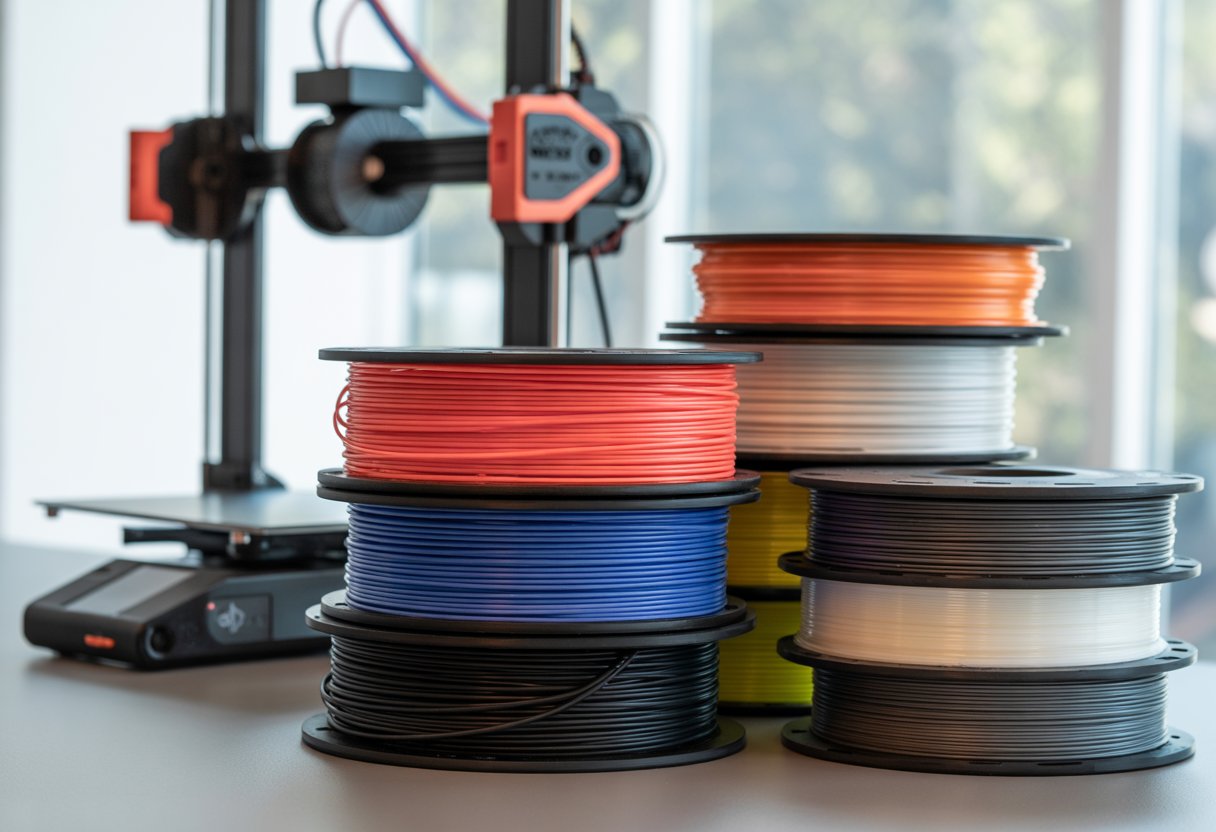
Choosing the best filament for Bambu Lab P1S & P1P helps you get clean prints with less hassle. Look for filament that feeds smoothly, sticks well, and stays stable at high speed.
Bambu Lab PLA prints best out of the box on the P1S and P1P, with PETG as a strong second choice. These printers handle many brands, but Bambu Lab filament matches the hardware and profiles, so you get steady results fast.
Other good options exist if you tune settings and store filament right. Material choice also depends on strength, heat, and finish.
Key Takeaways
- Bambu Lab PLA offers the easiest and most reliable prints
- PETG adds strength with small setting changes
- Good tuning and storage improve any filament choice
Looking for the industry-standard size? Our 1.75mm filament collection offers tight diameter control (±0.02mm tolerance) for smooth extrusion and fewer jams on your P1S and P1P.
What Makes a Filament the Best for Bambu Lab P1S & P1P?

The best results come when the filament matches the printer’s speed, fits the spool holder, and works with the Automatic Material System. The P1S and P1P print fast and need clean feeding.
Speed and Print Quality Requirements
Bambu Lab P1S and P1P print at high speed. Your filament must melt quickly and flow smoothly. If not, you might see weak layers or rough walls.
PLA and PETG made for high-speed 3D printing work best. Bambu Lab filament works well because Bambu Studio already has tuned profiles for it.
Look for these traits:
- Tight diameter control for even layers
- Low moisture to reduce popping and stringing
- Stable color so layers look clean at speed
Cheap filament can work, but results vary. Slowing the print can help with off-brand rolls, but you lose the speed advantage of these printers.
Spool Design and Fitment
Spool shape matters. The P1S and P1P feed filament fast, so the spool must unwind smoothly. Poor spools can snag and cause under-extrusion.
Key spool features to check:
- Standard width and hub size
- Smooth edges, not sharp plastic
- Even winding, no loose loops
Cardboard spools may shed dust, which can reach gears and sensors. Some users get better results after swapping cardboard spools to plastic ones.
If you use the AMS, fit becomes even more important. Some off-brand spools need adapters to avoid rubbing or slipping during long prints.
AMS Compatibility Considerations
The Automatic Material System adds speed and color changes, but also has limits. Not all filament works well with it. The AMS needs smooth spools, low drag, and clean filament.
For best AMS compatibility, check these points:
|
Feature |
Why It Matters |
|
Spool weight |
Heavy spools stress the feeder |
|
Spool width |
Wide spools can jam |
|
Filament stiffness |
Soft filament may buckle |
Bambu Lab filament fits the AMS with no changes. Profiles in Bambu Studio also handle loading and purge better. Other brands can work, but you may need to test first.
If you plan multi-color prints, choose known AMS-safe filament to avoid mid-print stops.
Need help choosing the right material for your project? Browse our complete 3D printer filament collection to find options from everyday PLA to engineering-grade specialty materials.
Top Recommended Filament Types for Bambu Lab P1S & P1P

The P1S and P1P handle many 3D printing filament types. Match the filament to your goal, your space, and how strong or flexible the part needs to be.
PLA and PLA+ for Everyday Printing
PLA and PLA+ are best for most everyday prints. They print fast, look clean, and need little setup. Use PLA filament for models, tools, toys, and home parts.
Bambu filament PLA runs smooth on both printers. It feeds well and keeps sizes accurate. Many other brands also work if the spool fits your setup.
PLA+ adds more strength than standard PLA. It bends less and handles light heat better. You still get easy prints without warping.
Need prints that survive high temperatures? Our heat resistant filament collection offers materials built to perform under demanding thermal conditions.
Why choose PLA or PLA+:
- Easy to print with low failure rates
- Sharp details and smooth surfaces
- No enclosure needed
|
Feature |
PLA |
PLA+ |
|
Strength |
Medium |
Medium-high |
|
Print Ease |
Very easy |
Easy |
|
Best Use |
Models, decor |
Light-use parts |
PETG for Functional Parts
PETG gives you more strength and heat resistance than PLA. It works well for parts that see stress or light outdoor use. Print hooks, holders, and brackets with confidence.
The P1S enclosure helps PETG print cleaner, but the P1P can still handle it. Use slower speeds and good cooling control.
PETG sticks well to build plates, so watch first layers. Bambu Lab filament PETG offers steady flow and fewer clogs, which helps on long prints.
PETG works well when you need:
- Better heat resistance
- Strong layer bonding
- Some flex without snapping
TPU and Flexible Filaments
TPU lets you print soft and bendy parts. Make phone cases, feet, seals, and grips. These prints feel rubbery and bounce back after bending.
The P1S handles TPU better due to its stable temp control. The P1P can print TPU if you slow things down. Direct drive helps a lot with flexible filament.
Bambu filament TPU stays consistent in size, which reduces jams. Dry storage matters, since TPU absorbs moisture fast.
TPU tips for success:
- Print slow and steady
- Keep filament dry
- Avoid sharp retraction settings
Looking to understand PETG applications better? Dive into our guide, What Is PETG Filament: A Guide in 3D Printing Applications for practical tips on strength and durability.
Best Filament Brands to Use with Bambu Lab P1S & P1P

You can print with many filament brands on the P1S and P1P. Some brands work better out of the box, while others need small tweaks. Watch for print quality, spool fit, and how well the filament feeds, especially if you use the AMS.
Bambu Lab’s Own Filaments
Bambu 3D printer filament works best if you want simple setup and steady results. Bambu tunes these filaments for the P1S and P1P, so profiles load fast and prints stay consistent.
Many spools include RFID tags. These tags let your printer pick the right settings on its own. This saves time and reduces errors.
Bambu PLA, PETG, and ABS all print clean with strong layer bonding. Prices can be higher, but bulk packs often cost less per spool. If you want fewer adjustments and fewer failed prints, this brand makes sense.
Having trouble with material compatibility? Check out our article: Do All 3D Printers Use the Same Filament? to understand filament standards and printer requirements.
Filament Brand Performance in the AMS
The AMS adds another layer to consider. Spool size, weight, and shape matter as much as the filament itself.
Bambu filament fits the AMS with no changes. Sunlu filament, Overture, and Elegoo usually fit, but some spools feel tight. Cardboard spools may need tape on the edges.
Brands like Voxelab, Hatchbox, and Flashforge feed well if the spool turns freely. Silk and glitter PLA from Amolen or Eryone can work, but you should slow retraction.
Keep filament dry, and check that each spool spins smoothly.
Filament Calibration and Print Settings
Good filament calibration helps your P1S or P1P print clean parts that stick well and fit as planned. Focus on the first layer, nozzle temperature, retraction, speed, and flow before changing anything else.
First Layer Test and Bed Adhesion
Start with a first layer test every time you use a new filament brand or type. This test shows if the filament sticks and spreads the right amount. Watch the lines as they print. They should touch but not smash together.
Clean the build plate with soap and water. For PLA, a clean plate often works fine. For PETG or ABS, use a thin glue stick layer to help with release and even grip.
Check your Z offset if the filament looks rough or lifts at the edges. Small changes make a big difference.
Temperature and Retraction Settings
Set the nozzle temperature based on the filament label, then fine-tune it. Run a temp tower test to find the lowest temp that still gives smooth layers and strong walls.
Lower temps reduce stringing. Higher temps improve layer bonding. Find the balance for your printer and room.
Adjust retraction settings next. For the P1S and P1P, start with short retraction distances. Increase slowly if you see strings. Too much retraction can cause clogs or weak layers.
Print Speed and Flow Rate Adjustments
Bambu printers run fast, but not all filaments like high speed. If prints look rough, slow down the outer walls first. Leave infill speeds higher to save time.
Run a flow rate test to dial in extrusion. Too much flow causes blobs and poor fit. Too little flow leaves gaps and weak parts.
Many generic profiles use lower flow limits on purpose. This helps avoid issues without full filament calibration. Custom profiles give better results once tuned.
Fitment Calibration Techniques
Use fitment calibration when parts need to snap or slide together. Print a small tolerance test before large projects. This saves time and filament.
Adjust horizontal expansion in small steps. Start with 0.05 mm changes. Test again after each change.
Keep notes for each filament. Save the profile once it fits right. You can reuse it later and get the same results every time.
Still deciding between popular materials? Learn the pros and cons in our article PETG vs PLA: Which Filament Is Best for 3D Printing? to make the right choice for your P1S or P1P.
Tips for Storage, Handling, and Specialty Filament Choices
Good filament care keeps your Bambu Lab P1S and P1P running well. Dry storage, careful handling, and the right specialty picks all affect print quality and strength.
Keeping Filament Dry and Ready to Use
Moisture causes weak layers, rough surfaces, and popping sounds during prints. You can avoid this with simple storage habits. Keep spools in airtight bins, a vacuum bag, or a dry box with silica gel.
PLA handles moisture better than nylon or TPU, but it still benefits from dry storage. PETG and ABS absorb water faster, so store them right after use. If filament feels brittle or prints poorly, dry it before printing.
Quick storage tips:
- Use labeled bags to track material and color
- Add fresh desiccant every few months
- Avoid open air near windows or kitchens
Specialty and Magnetic Filaments
Specialty filaments need extra care and correct settings. Magnetic filament often contains metal powder, which adds weight and wear. Use a hardened nozzle and slower speeds to protect your printer.
Check slicer profiles before printing. Some blends work best with the Bambu Tough setting, which boosts strength and layer bonding. This helps parts that face stress or heat.
Print small test parts first. Specialty filaments vary by brand, even with the same label. Watch for clogs and keep spools clean to avoid dust buildup.
Choosing Filaments for Visual Appeal
Looks matter for display parts and gifts. Glitter PLA adds shine and hides layer lines, making prints look smoother. It works well on the P1S and P1P with standard PLA settings.
Use a larger nozzle, like 0.6 mm, to prevent clogs from glitter flakes. Slow the print for better flow. Bright colors show details better, while dark shades hide small flaws.
Popular visual choices:
- Silk PLA for glossy surfaces
- Matte PLA for soft textures
- Color-change PLA for fun effects
Store these spools like standard PLA to keep colors sharp and prints clean.
Want parts that handle heat and stress? Check out our ABS filament collection for tough, functional prints with excellent impact resistance and temperature stability.
Design and Software Considerations with Filament Choice
Your filament choice affects how your model looks, prints, and fits. Software tools help you spot issues early and tune settings for the P1S and P1P so parts print clean and strong.
Previewing Results in Bambu Studio
Bambu Studio shows how your filament will behave before you print. Use the Preview tab to check layer lines, supports, and color changes. This matters more with PETG, ABS, and filled filaments.
Pay close attention to these items:
- Layer view: Look for thin walls that may fail with brittle PLA.
- Support style: Dense supports help flexible TPU but raise print time.
- Speed and cooling: Slow down ABS to cut warping.
You can also load filament profiles made for Bambu printers. These profiles set temps and flow for common brands. Adjust only one setting at a time so you can see what changes.
|
Check |
Why it matters |
|
Flow rate |
Prevents gaps with PETG |
|
Cooling |
Reduces warp with ABS |
|
Brim size |
Helps tall parts stick |
Getting the Most from Design Software
Your design software shapes how well a filament prints. In Onshape, add fillets to sharp corners. This reduces stress cracks in PLA and PETG. Keep wall thickness above 1.2 mm for better strength.
In FreeCAD, set clear tolerances. PETG needs more space than PLA. Leave at least 0.3 mm for moving parts. Use simple chamfers instead of tight snaps for TPU.
Export clean files. Avoid tiny details that soft filaments can’t hold. Align parts to reduce supports. When you design with the filament in mind, your P1S or P1P prints faster and with fewer fails.
Searching for a cost-effective alternative without sacrificing quality? Discover our Bambu filament alternative collection designed to work perfectly with your P1S and P1P profiles.
Wrap Up
Choosing the best filament for Bambu Lab P1S & P1P doesn't need to be hard. Start with PLA for ease and reliability, then try PETG when you need strength. Keep your filament dry and tune your settings for each material type.
Whether you stick with Bambu Lab's own filament or explore trusted third-party brands, the key is matching the material to your project needs.
Ready to upgrade your prints? Try Siraya Tech 3D printer filaments for consistent quality, tight tolerances, and performance you can count on. Your next great print starts with the right filament choice.
Confused about which material fits your needs? Get clarity by reading our guide 3D Filament Types: Complete Guide for Every 3D Project for detailed breakdowns of each filament type.
Frequently Asked Questions
What filaments work best with the Bambu Lab P1S & P1P?
PLA prints the easiest and works great for most parts. PETG adds strength and heat resistance and still prints well.
ABS and ASA work best on the P1S because it has an enclosure. The open P1P can print them, but you may see warping.
Can I use third-party filaments in the Bambu Lab P1S, or should I stick to official products?
You can use third‑party filaments with no problem. Many users print daily with brands like Polymaker and eSun. Bambu Lab filament works well and saves setup time. Third‑party filament can cost less and still give clean results.
Does the filament diameter matter for the Bambu Lab P1S & P1P, and if so, what size should I use?
Yes, the size matters. Use 1.75 mm filament only. Both printers tune their profiles for this size. Other sizes will not feed right.
Are there any special filament types that offer the best prints on the Bambu Lab P1S & P1P?
PLA+ gives smoother walls than basic PLA. PETG prints strong parts with good layer stick. Carbon fiber 3D printer filaments can look nice, but they need a hardened nozzle. TPU works for soft parts, but it prints slower.
What have users on Reddit found to be the top filament choices for the Bambu Lab P1S?
Many Reddit users praise Bambu Lab PLA for steady quality and fair price. Others like Polymaker PolyLite PLA and eSun PLA+. Some users save money with off‑brand filament and still get good prints. Spool fit can vary, so check before long prints.
How does the filament requirements for Bambu Lab P1S & P1P compare to those recommended for Bambu AMS and A1?
The P1S and P1P accept most standard filaments. The AMS needs spools that fit its size and weight limits. The A1 is similar to the P1P but is mainly used with PLA and PETG. Flexible filaments work better without the AMS.