
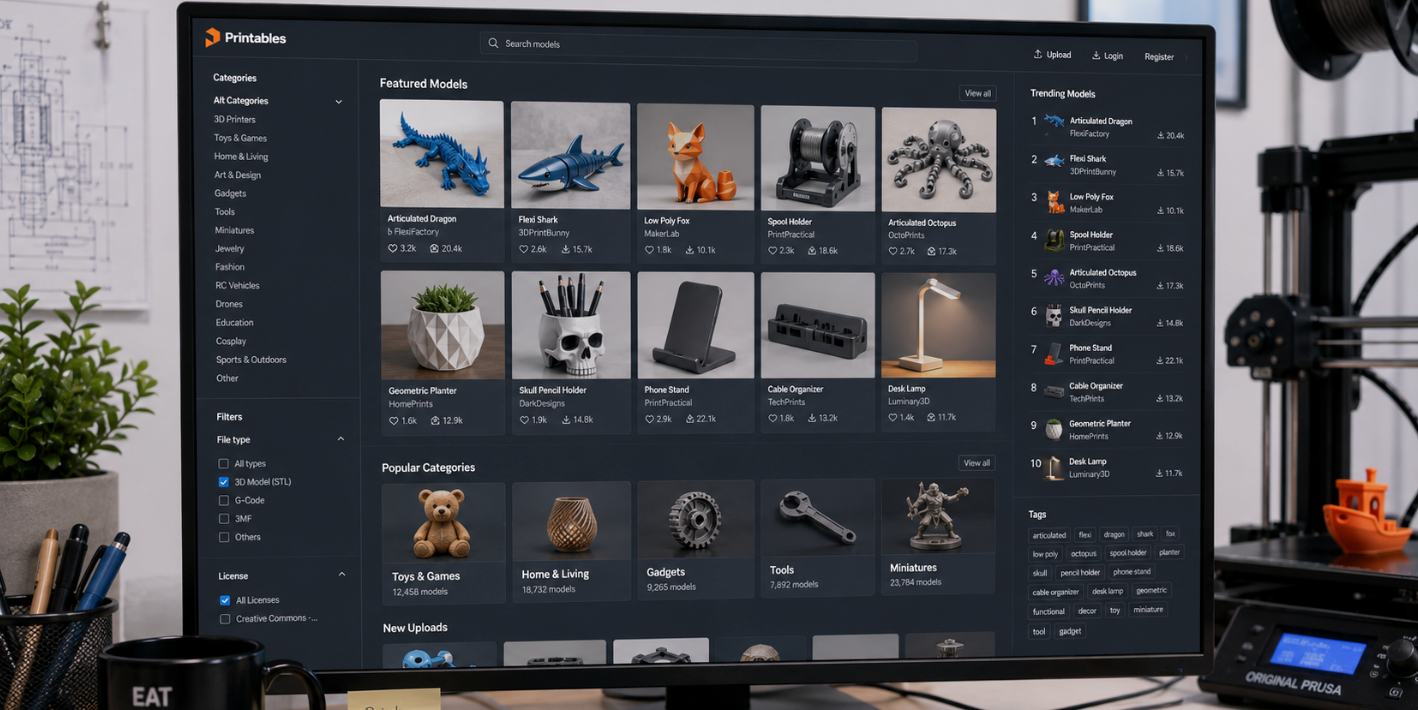
The best places to download free STL files are Printables and Thingiverse for general models, MakerWorld for multi-color prints, MyMiniFactory and Cults3D for miniatures, and Thangs or Yeggi to search every site at once. All offer huge free libraries. Always check the license before you print or sell.
Looking for free STL files to print? An STL file is the digital blueprint that tells your 3D printer what shape to make.
You can design your own, but the fastest way to start printing today is to download a ready-made model. The hard part is knowing where to look without wasting time on low-quality or paid-only sites.
This guide ranks the best free STL sites in 2026 by category, shows what each is best for, explains how to check licenses, and helps you pick the right material once your file is ready.
- Best overall: Printables and Thingiverse hold millions of free, community-tested models.
- Best for miniatures: MyMiniFactory and Cults3D have huge free sections for tabletop and figures.
- Best for multi-color: MakerWorld offers one-click slicing and color-ready designs.
- Search everything at once: Thangs and Yeggi scan many sites so you find files faster.
- Print it right: match your file to the correct resin or filament for the best result.
What is an STL file?
STL stands for Standard Tessellation Language. It is the most common 3D printing format and describes an object's surface as a mesh of tiny triangles, with no color or texture data.
You cannot print an STL directly. First you load it into slicer software like Bambu Studio, OrcaSlicer, Cura, or PrusaSlicer, which cuts it into layers and turns it into G-code your printer follows.
Many newer models also come as 3MF files, which store color and settings too, but STL remains the universal standard.
| Site | Type | Best for | Cost |
|---|---|---|---|
| Printables | Repository | All-round quality models | Free |
| Thingiverse | Repository | Largest open library | Free |
| MakerWorld | Repository | Multi-color, Bambu users | Free |
| MyMiniFactory | Marketplace | Tested miniatures | Free / Paid |
| Cults3D | Marketplace | Unique, rare designs | Free / Paid |
| Thangs | Search engine | AI search across sites | Free |
| Yeggi | Search engine | Fast meta-search | Free |
| NIH 3D | Educational | Science & medical models | Free |
| Smithsonian 3D | Educational | Museum & history scans | Free |
| Meshy / AI tools | Generator | Custom models from text | Free / Paid |
The Best free STL repositories

1. Printables — best overall
Run by Prusa Research, Printables has over 1.5 million free models and a clean, easy interface with no ads.
Files are community-tested, organized into clear categories, and backed by regular design contests that keep fresh designs flowing.
It is the top alternative to Thingiverse and a great first stop for almost any project.
2. Thingiverse — largest free library
Thingiverse is the oldest and biggest 3D printing community, with millions of free models and a strong open-source culture. You can find everything from toys to useful printer upgrades.
The layout feels dated and pages can load slowly, but the sheer size of the free library keeps it essential.
3. MakerWorld — best for multi-color
Run by Bambu Lab, MakerWorld is growing fast and shines for multi-color designs and one-click cloud slicing. It is especially handy for
Bambu Lab owners, though anyone can browse and download. Community contests reward creators and keep new models coming.
Best marketplaces with free STL sections
1. MyMiniFactory — best for miniatures
MyMiniFactory is the go-to for tabletop minis, gaming models, and collectibles.
Many files are paid, but the free section is large and every model is tested for printability, so you waste less filament on failed prints. A favorite for D&D and wargaming fans.
2. Cults3D — best for unique designs
Cults3D is a French marketplace where independent designers sell their work, with a dedicated free section. Its strength is rare, high-quality, and original designs you will not find elsewhere.
Expect some ads and paid-only top models, but the free finds are worth the dig.
3. Pinshape and Creality Cloud — worth a look
Pinshape offers a well-organized mix of free and paid designs across toys, art, and practical items.
Creality Cloud started for Creality owners but welcomes everyone, with a steady stream of free and paid STLs and a friendly community.
Best STL search engines
1. Thangs — best AI-powered search
Thangs indexes more than 15 million files and uses smart search to suggest similar models, even from a reference image.
If you want variations on a design or cannot find an exact match, Thangs is powerful. You do need to register to download.
2. Yeggi — fastest meta-search
Yeggi is like Google for STL files. Instead of hosting models, it scans many sites at once and ranks the most relevant results in seconds.
You can filter for free or paid and see what is trending. A perfect first search when you know exactly what you want.
Start with a search engine like Yeggi or Thangs to scan everything at once, then go to the source site to download. This beats opening ten tabs and scrolling each one.
Best free STL files for education and science
1. NIH 3D — science and medical models
NIH 3D offers thousands of free, science-focused models, from cells and viruses to DNA strands and lab tools. Backed by official health institutes, the files are trustworthy and perfect for students, teachers, and researchers.
2. Smithsonian 3D and NASA 3D — history and space
Smithsonian 3D lets you download high-quality scans of real museum objects, from fossils to space shuttles, each with educational notes. NASA 3D offers free models of planets, rockets, and space tools. Both are excellent for classrooms and curious makers.
Can't find it? Generate your own STL
If no site has what you need, AI tools can create a custom STL for you. Generators like Meshy turn a text prompt or photo into a 3D model in minutes, which is great for original, organic, or stylized shapes.
For functional parts with exact measurements, design in CAD instead, since AI is weaker at tight engineering tolerances.
Either way, run a repair and remesh step so your file is watertight before slicing.
How to check the license before you print
This is the step most guides skip, and it matters, especially if you plan to sell prints. "Free to download" does not always mean "free to sell." Before you print, check the model's license:
- Personal use only. You can print it for yourself but not sell the print.
- Creative Commons with attribution. You can use it if you credit the designer; some versions block commercial use.
- Commercial use allowed. You can sell prints, sometimes with conditions.
- Copyrighted or fan art. Models of branded characters or logos can break copyright even if the file is free.
When in doubt, read the license on the model page or message the designer. Respecting creators keeps these free libraries healthy.
Match your STL file to the right material
A free file is only as good as the material you print it in. Once you have your STL, pick the resin or filament that suits the job.
| Your STL is a | It needs | Recommended material |
|---|---|---|
| Miniature or figurine | Crisp detail, tough finish | Fast ABS-Like Resin |
| Tabletop model (durable) | Strength, low brittleness | Blu Tough Resin |
| Jewelry for casting | Clean burnout | Cast – Castable Resin |
| Functional part | Strength & durability | Fibreheart Filament |
| Flexible item (case, toy) | Bend without breaking | Flex TPU Filament |
| High-temp model | Heat resistance | Sculpt – High Temp Resin |
| Display piece | Smooth, no layer lines | Aegis Coating System |
How to print a free STL file
- Download the STL (or 3MF) from a trusted site and check the license.
- Open it in a slicer like Bambu Studio, OrcaSlicer, Cura, or PrusaSlicer.
- Choose your printer and material profile, then add supports if the model needs them.
- Slice and preview layer by layer to catch problems before printing.
- Export the G-code and send it to your printer. Start with a tested profile for best results.
Start downloading and printing today
Finding free STL files has never been easier. Start with Printables or Thingiverse for everyday models, use MyMiniFactory or Cults3D for miniatures, and search Thangs or Yeggi when you need something specific. Always check the license before you print or sell. The download is only the first step, though.
Pairing your file with the right Siraya Tech resin or filament and a tested slicer profile is what turns a free model into a sharp, strong, finished print you will be proud to keep or sell.
Frequently asked questions
What is the best website for free STL files?
Printables and Thingiverse are the best all-round sites for free STL files, with millions of community-tested models and no cost. For miniatures, MyMiniFactory and Cults3D have strong free sections. If you want to search many sites at once, use a search engine like Yeggi or Thangs, which scans multiple repositories and ranks the most relevant results in seconds.
Are STL files really free to download?
Yes, many sites offer huge libraries of completely free STL files, including Printables, Thingiverse, MakerWorld, NIH 3D, and Smithsonian 3D. Marketplaces like Cults3D and MyMiniFactory mix free and paid models, so the top designs may cost money. "Free to download" does not always mean "free to sell," so always check the model's license first.
Can I 3D print an STL file directly?
No. An STL file cannot be printed on its own. You first open it in slicer software such as Bambu Studio, OrcaSlicer, Cura, or PrusaSlicer. The slicer cuts the model into thin layers and converts it into G-code, the step-by-step instructions your printer follows. Without slicing, the printer has no path to follow and cannot make the object.
Can I sell prints made from free STL files?
Only if the license allows it. Some free files are for personal use only, some use Creative Commons that may block commercial use, and some allow selling with conditions like crediting the designer. Models of branded characters or logos can break copyright even when free. Always read the license on the model page before you sell anything.
What is the difference between STL and 3MF files?
STL is the older universal format that stores only the shape as a triangle mesh, with no color or material data. 3MF is newer and stores geometry plus color, materials, and print settings in a smaller file, which makes it better for multi-color and multi-material prints. Most slicers read both, but STL remains the most widely supported standard.